Changing HTA Window Size and Centering – Deployment Wizard
I’ve been working on a custom front-end wizard for my deployments lately. I’ve been combining items onto a single screen for the techs to use, as a result, I needed to resize the size of the window to accommodate the new items. After I was able to accomplish then, then the window was off the screen to the right and bottom, so I wanted to have it automatically center on the screen for me. Thanks to Johan Ardwidmark, Jason Scheffelmaer, and Keith Garner for the suggestions and always helpful tips.
Window Size
In the xml file for the wizard, you can modify the window size by adding the below text into the /global section.
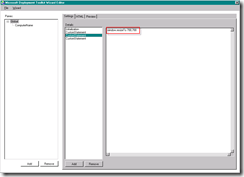
You can also add this data through the wizard editor. Select “Add”, then “CustomStatement”, then add “window.resizeTo 700,700 “ into the pane.
Centering Window On Screen
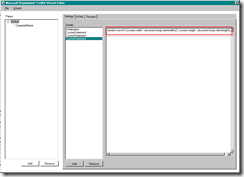
You can also add this data through the wizard editor. Select “Add”, then “CustomStatement”, then add “window.moveTo (screen.width - document.body.clientwidth)/2, (screen.height - document.body.clientheight)/2” into the pane.
Here are a couple general HTA scripting examples by the Scripting Guy for reference: