Advanced Format Hard Drives - Information about Microsoft support policy for large sector drives in Windows
…
Windows Server 2003 and Windows XP
Any large sector disks, such as Advanced Format disks, are not supported by Microsoft for installation on systems that are running Windows Server 2003, Windows Server 2003 R2, or Windows XP.
….
Over the next few years, the data storage industry will be transitioning the physical format of hard disk drives from 512-byte sectors to 4,096-byte sectors (also known as 4K sectors). This transition is driven by several factors, including increases in storage density and reliability. This transition causes incompatibility issues with existing software (operating systems and applications).
This article describes the current Microsoft support policy for these new drive types on Windows operating systems. Applications and hardware devices may have reliability and performance issues when they are connected to these new types of drives. Contact your application and hardware vendors about their support policies for these new drive types.
There are three drive types that we will discuss here. Because Microsoft support policy differs for each, verify the drive type that you have installed before you read farther.
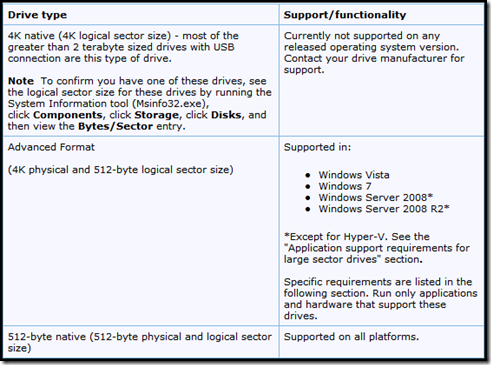
Specific requirements for Microsoft support by operating system version
Windows Vista and Windows Server 2008
-
Install the hotfix from the following Microsoft Knowledge Base article:
2470478 (http://support.microsoft.com/kb/2470478/ ) Applications that are built on ESENT and that run on a Windows Vista-based or Windows Server 2008-based computer may not work correctly after the reported physical sector size of the storage device changes
-
Make sure that the drivers and firmware for your storage controller and for your other hardware components are updated. Also, make sure that they support large sector drives.
-
To be delivered set of fixes.
Windows 7 and Windows Server 2008 R2
-
Install Service Pack 1 (SP1), or install the update from the following Microsoft Knowledge Base article:
982018 (http://support.microsoft.com/kb/982018/ ) An update that improves the compatibility of Windows 7 and Windows Server 2008 R2 with Advanced Format Disks is available
-
Make sure that the drivers and firmware for your storage controller and other hardware components are updated. Also, make sure that they support large sector drives.
-
Use the updated Windows Preinstallation Environment (Windows PE) for SP1 that will be released as part of the updated pieces of the Windows Automated Installation Kit (AIK) for Windows 7 SP1 and of the Windows OEM Preinstallation Kit (OPK). Or, embed update 982018 into Windows PE.
To download the Windows Automated Installation Kit (AIK) for Windows 7 SP1, visit the following Microsoft website: http://www.microsoft.com/downloads/en/details.aspx?FamilyID=0aee2b4b-494b-4adc-b174-33bc62f02c5d (http://www.microsoft.com/downloads/en/details.aspx?FamilyID=0aee2b4b-494b-4adc-b174-33bc62f02c5d)
Windows Server 2003 and Windows XP
Any large sector disks, such as Advanced Format disks, are not supported by Microsoft for installation on systems that are running Windows Server 2003, Windows Server 2003 R2, or Windows XP.
Application support requirements for large sector drives
In addition to Windows operating system support, administrators and users should make sure that their applications support these large sector drives. Scenarios and issues to be aware of include performance, reliability, backup, and recovery. Support statements for some Microsoft applications and products are listed here:
- Hyper-V: http://support.microsoft.com/kb/2515143 (http://support.microsoft.com/kb/2515143)
- Microsoft SQL Server: http://blogs.msdn.com/b/psssql/archive/2011/01/13/sql-server-new-drives-use-4k-sector-size.aspx (http://blogs.msdn.com/b/psssql/archive/2011/01/13/sql-server-new-drives-use-4k-sector-size.aspx)
- Windows Home Server v1: http://support.microsoft.com/kb/2385637 (http://support.microsoft.com/kb/2385637)
- Microsoft Exchange Server: http://technet.microsoft.com/en-us/library/ee832792.aspx#Phys (http://technet.microsoft.com/en-us/library/ee832792.aspx#Phys)
- Third-party applications and hardware: Applications and hardware devices may have reliability and performance issues when they are connected to these new drives. Please contact your application and hardware vendors about their support policy for these drives.
Known compatibility issues
The following are known compatibility issues that may occur when you use large sector drives:
- If you are using a logical sector drive of a size other than 512 bytes, Windows system image backup and restore operations may fail with the following error message
One of the backup files could not be created.
Details: The request could not be performed because of an I/O device error.
Error code: 0x8078002A - If you create a virtual hard disk (VHD) on a native 4K sector drive by using Disk Management or Hyper-V in Windows Server 2008 R2, the operation fails with an “Incorrect Function” error.
-
In Disk Management, the following error occurs:
Virtual Disk Manager Incorrect function
-
In Hyper-V, the following error message is generated when the New Virtual Hard Disk Wizard is used:
The server encountered an error trying to create the virtual hard disk. The system failed to create ‘I:\Disk0.vhd.’ Error Code: Incorrect function.
-
In Hyper-V, the following error message is generated when the New Virtual Machine Wizard is used:
The server encountered an error while configuring hard disk on TestVM. The system failed to create ‘I:\TestVM\TestVM.vhd.’ Error Code: Incorrect function.
-