Microsoft Deployment Toolkit Dynamic Applications - Using a Wildcard For Mappings
One of the questions in my recent SCCM Guru webcast asked if it was possible to use a wildcard in the ARPName table for the mappings. I was pretty sure I had done it in the past but couldn’t find my notes on it.
In order for a wildcard to work in the table, we need to update the query in the stored procedure.
The default query looks like this: (ProductID0 was changed to DisplayName0 like I talked about in my webcast)
SELECT * FROM PackageMapping
WHERE ARPName IN
(
SELECT DisplayName0 FROM CM_DB.dbo.v_GS_ADD_REMOVE_PROGRAMS a, CM_DB.dbo.v_GS_NETWORK_ADAPTER n
WHERE a.ResourceID = n.ResourceID AND
MACAddress0 = @MacAddress
)
In order to use a wildcard in the mapping table, we need to modify the query to the following:
SELECT * FROM PackageMapping
WHERE EXISTS
(
SELECT 1
FROM CM_DB.dbo.v_GS_ADD_REMOVE_PROGRAMS a
INNER JOIN CM_DB.dbo.v_GS_NETWORK_ADAPTER n ON a.ResourceID = n.ResourceID
WHERE MACAddress0 = @MacAddress
AND DisplayName0 LIKE ARPName
)
Little different query, but this allows us to use a wildcard in the mapping table.
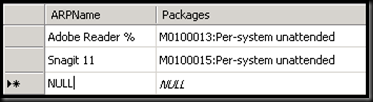
Your mapping table can then look this this:
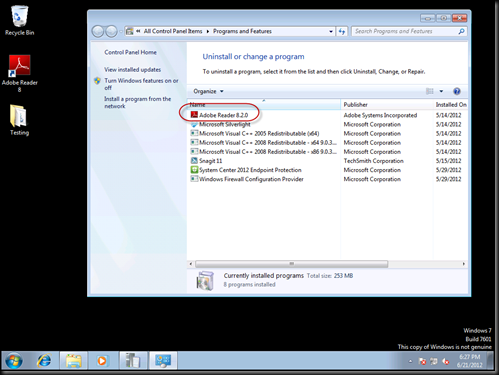
Here you can see a client with Adobe Reader 8.2.0 installed.
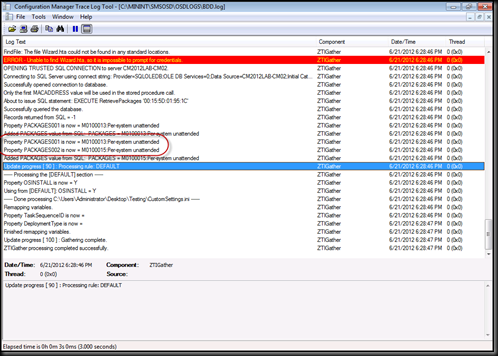
You can see the mapping successfully processed in the log.
There you go! Now you can save yourself a number of mappings for products. In my demos for the webcast I had 3 different mappings for versions of Adobe, now all condensed to a single entry.
-Chris