System Center 2012 Configuration Manager - How to Identify How Many Incremental Collections You Have
A little known fact with ConfigMgr is that there is a “soft” limit to the number of incremental collections you can have. It’s actually referenced here in TechNet. The factors that affect where this actual limit is is dependent upon your total number of collections, the frequency of new resources being added, the number of clients in your hierarchy, and the complexity of the collection membership rules.
If you surpass the approx. 200 limit for your incremental collections, then you will experience some interesting behavior with your collections. Some will update, some won’t, it appears to be random. I’ve seen this at a few clients that have had over 200 collections set to incrementally update.
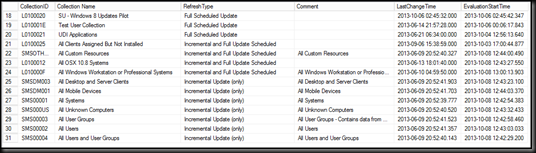
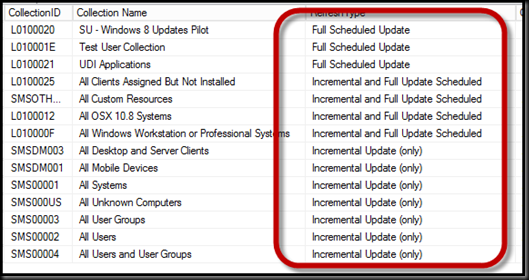
I’ve had a query I’ve been using for awhile at clients, however Steve Thompson demo’d a much prettier query at MMS. His query is shown below:
1: -- Collection eval - incremental updates 2: -- CASE, ALIAS, ORDER BY 3: SELECT CollectionID, Name as [Collection Name], 4: CASE RefreshType 5: WHEN 1 THEN 'No Scheduled Update' 6: WHEN 2 THEN 'Full Scheduled Update' 7: WHEN 4 THEN 'Incremental Update (only)' 8: WHEN 6 THEN 'Incremental and Full Update Scheduled' 9: ELSE 'Unknown' 10: END AS RefreshType, 11: Comment, LastChangeTime, EvaluationStartTime 12: FROM dbo.v_Collection 13: ORDER BY RefreshType, [Collection Name]Running this query in SQL Management Studio will produce a list of the collections you have and how they are configured. It’s important to take note of of how many collections you have that are configured for incremental.
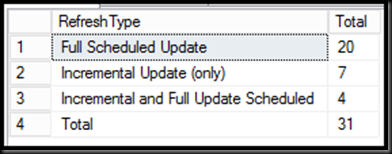
In addition here is another query that gives you a rollup view of your collection counts.
1: -- WITH ROLLUP 2: SELECT 3: CASE RefreshType 4: WHEN 1 THEN 'No Scheduled Update' 5: WHEN 2 THEN 'Full Scheduled Update' 6: WHEN 4 THEN 'Incremental Update (only)' 7: WHEN 6 THEN 'Incremental and Full Update Scheduled' 8: ELSE 'Total' 9: END AS RefreshType, 10: COUNT(*) AS Total 11: FROM dbo.v_Collection 12: GROUP BY refreshtype, refreshtype WITH ROLLUP