System Center 2012 Configuration Manager R2 Upgrade: Notes from the Field-Updated
Here are just a couple of issues I’ve encountered doing R2 upgrades. I wanted to post the solutions for anyone that might also run into these issues.
This post was last updated on 3/13/2014.
KB’s that have been released to address R2 issues to date:
An update is available for the “Operating System Deployment” feature of System Center 2012 R2 Configuration Manager
http://support.microsoft.com/kb/2905002
You cannot stage a Windows PE 3.1 boot image to a Windows XP-based computer in System Center 2012 R2 Configuration Manager
http://support.microsoft.com/kb/2910552
Per-computer variables for imported computers are not read in System Center 2012 R2 Configuration Manager
http://support.microsoft.com/KB/2907591
Management Points:
If you have a ConfigMgr client installed on a site system hosting a MP, the MP upgrade will fail. If this happens, then you will need remove the MP, remove the ConfigMgr client. Reinstall the MP, and then install the new R2 ConfigMgr client.
If you have a secondary site, you won’t be able to uninstall the client or MP, you’ll need use the old school ccmclean (using the /all switch) to remove the MP and client. Once that is removed, the MP will automatically reinstall, then you can proceed to install the new client.
Easy solution for all, is to simply remove the ConfigMgr client prior to the upgrade :)
Boot Images:
Take a screenshot of your drivers added to your boot images. Once you upgrade the ADK to 8.1, and you will have new boot images in R2, you won’t be able to see what drivers are on your old boot images. ConfigMgr supports legacy boot images, but you can’t modify the drivers and they have removed the tab so you can’t see what you had added either.
Better yet, get in the habit of categorizing your drives. I always create a WinPE_x64 and WinPE_x86 category and any time I add a driver to the boot image, I also add it to that category so I can see what is in use easily.
Keep in mind with ConfigMgr 2012 R2, your boot images are now WinPE 5.0, which is Windows 8.1 based, so the network/storage drivers you are adding will be need to be Windows 8.1, regardless of the OS you are deploying (Windows 7, Windows 8, etc).
Reporting Services:
I’ve seen a few times where the SRS doesn’t get upgraded properly. When attempting to run reports I’ve seen “cannot read from the next data row for the dataset..”
This can be resolved by recompiling the mof using the following command:
mofcomp “C:\Program Files (x86)\Microsoft SQL Server\100\Shared\sqlmgmproviderxpsp2up.mof”
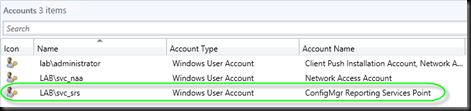
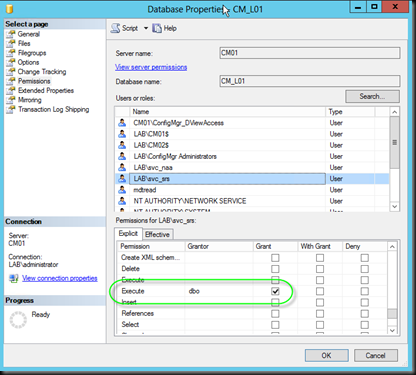
I’ve also seen permission issues, which can be resolved by granted the Execute permission to the account configured as the SRS service account.
Task Sequences:
It’s been already reported that some people will experience issues with the NAA credentials being lost. So if you fail to download files during WinPE, you can try adding a new NAA and removing your old one. If you want to add your original one back, you need to add a new one, remove the original, then re-add the original and remove the 2nd one, confused yet? :)
In general it’s a good idea to recreate new MDT 2013 Task Sequences as well, your old MDT 2012 Update 1 TS’s should work as long as you still have the old toolkit package available, however it’s a good idea to create new ones and move your custom steps over into the new Task Sequence.
I’ve also ran into issues where the OS Image download is slow. In addition, in combination with this, I’ve seen where the Task Sequence will apply the OS, install the ConfigMgr client and then reboot and suddenly fail. Reviewing the logs you’ll see a 80072ee2 error (system cannot find the file specified).
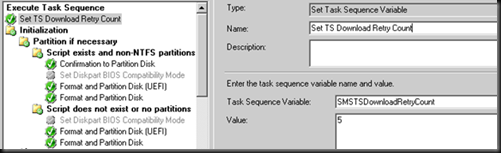
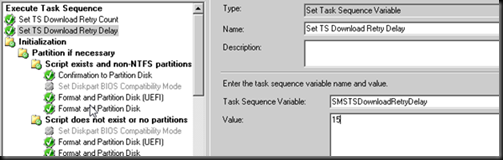
If you encounter this, you will need to add two new R2 variables to beginning of your Task Sequence.
- SMSTSDownloadRetryCount*: Use this variable to specify the number of times that Configuration Manager attempts to download content from a distribution point.*
- SMSTSDownloadRetryDelay*: Use this variable to specify the number of seconds that Configuration Manager waits before it retries to download content from a distribution point.*