System Center 2012 Configuration Manager: New site install with SQL 2014 = Not Supported
Recently was standing up a new site and decided to use SQL 2014. According to the support page, SQL 2014 is supported. It is supported to upgrade from SQL 2012 to SQL 2014, but not for new site installs.
However, if you use SQL 2014, you will encounter an error during the install process.
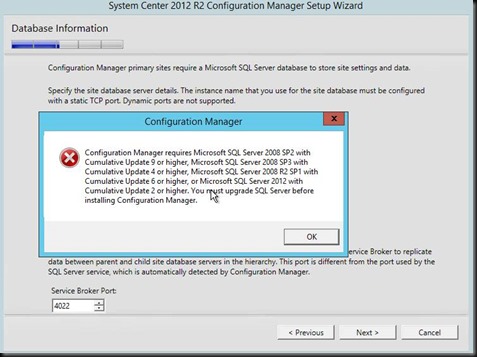
Additionally attempting to restore a site against SQL 2014 will cause errors as well, so another thing to take into consideration.
Also, WSUS isn’t fully supported on SQL 2014 with Server 2008 R2. So there’s another gotcha you’ll run into.
Here is a support statement from the Configuration Manager Team Blog:
Couple key notes from that blog posting:
It is not supported to install a new Configuration Manager site with SQL Server 2014 installed.
The following software updates are required to use SQL Server 2014 to host the site database:
Cumulative Update 1 for System Center 2012 R2 Configuration Manager - http://support.microsoft.com/kb/2938441
System Center 2012 Configuration Manager SP1 – http://support.microsoft.com/kb/2923078. To apply this hotfix, you must have Cumulative Update 4 (http://support.microsoft.com/kb/2922875) for System Center 2012 Configuration Manager SP1 installed.
Known limitations:
Windows Server Update Services (WSUS) 3.2 Server cannot be installed on Windows Server 2008 R2 SP1 and Windows Server 2008 SP2 with SQL Server 2014 installed. With this configuration, the Configuration Manager Software updates feature will not work correctly.