Working With Chris, Part 1: Setting Up Your Claude Preferences
Out of the box, Claude doesn’t know how you work. It guesses. Sometimes it invents things, and sometimes its writing reads like a machine wrote it, because one did.
A few minutes of setup fixes most of that. The catch is WHERE you put that setup, and I learned that one the hard way.
If you’re just getting started with Claude and feel like everyone else has some secret config you don’t, you’re fine. Most of us figured this out by tripping over it.
How I found out
In Q3 2026 I did an audit of my own rules. I had about fourteen standing rules in the instructions field on claude.ai: US English, absolute dates, be brief, never make things up, that kind of thing. I assumed they applied everywhere I used Claude.
They didn’t. When I checked Claude Code, which by then is where I did most of my work, thirteen of the fourteen rules weren’t there. Only one had made it across: my “no em dashes” rule, because I’d also put it in Claude Code’s own settings file. Which explained why I had to keep asking “Why did you do that? I thought we had a rule for that…” and so on.
So the tool doing the most work for me was getting the least instruction. For a good while, it had been running without my never-make-things-up rule. Not good.
Where your rules actually live
Each place you use Claude reads its own set of instructions. They don’t share.
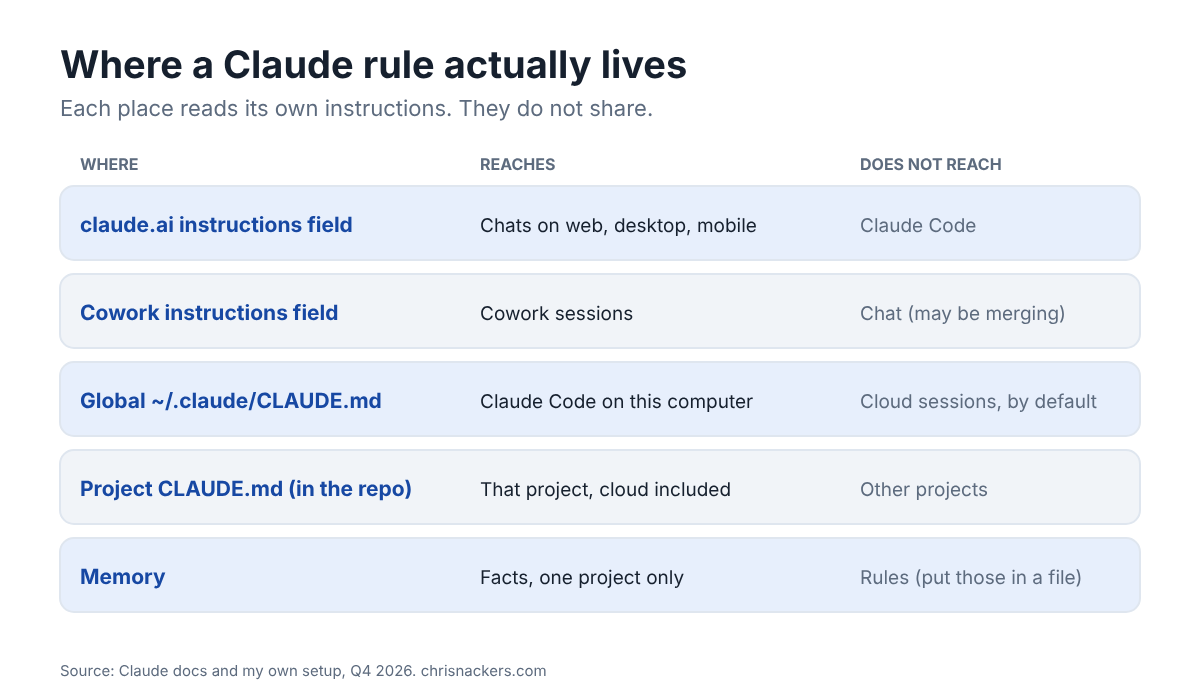
- “Instructions for Claude” in your claude.ai settings. Applies to your chats on web, desktop, and mobile. Claude Code doesn’t read it. (The docs don’t say that outright, but they list everything Claude Code reads, and this field isn’t on the list.)
- Cowork’s own instructions field, in the desktop app settings. Separate from the chat one, and neither reads the other. Keep in mind: on one of my machines these now show as one merged field, so this may be changing. Check yours.
- Claude Code’s global file,
~/.claude/CLAUDE.md. Applies to every Claude Code session on that computer, in any project. - A project’s own
CLAUDE.md, in the repo. Applies to every session in that project, including cloud sessions, because it travels with the code. - Memory. Facts Claude saves for itself, per project. Great for “where does this file live”, not for “always do this”.
NOTE: a cloud session starts from a fresh copy of your repo, so your global file isn’t there by default. That lines up with what I’ve seen in my own cloud sessions. If you want your personal rules in the cloud, either put them in the repo’s CLAUDE.md or use a setup script that writes the global file for you.
If you ever managed Group Policy, the layering will feel familiar. Claude Code reads its files broadest first and most specific last: an organization-wide file your IT team can push out (with Group Policy, even), then your own global file, then the project’s file. Like LSDOU, the layer closest to the work is read last.
Two differences matter, though:
- There’s no clean “winner”. GPO resolves a conflict for you, and the closest container wins. Claude reads all the files together, and the docs say if two rules contradict, it may pick one arbitrarily. So don’t count on an override. Fix the conflict.
- The chat and Cowork fields aren’t layers at all. They’re separate systems that never read each other, like two machines in different forests.
What DOES carry over from GPO: a rule in the wrong place doesn’t throw an error. It just quietly doesn’t apply.
The three-line test
When you want Claude to remember something, ask one question: where should this apply?
- Everywhere, whatever the work: the global file (and paste it into the chat and Cowork fields too).
- One project: that project’s
CLAUDE.md. - It’s a fact, not an instruction (where something lives, what a project is): memory.
The second time it bit me
Same quarter, different problem. I’d been telling Claude “standing rule” whenever I wanted something to stick, and it dutifully saved each one. As a memory. In whatever project folder the session happened to be running in.
A cleanup pass later found six of my “always” and “never” rules sitting in one project’s memory folder. None of them had anything to do with that project. Any session started anywhere else would never see them.
The fix was one rule in the global file. Here it is, written so you can paste it as-is:
When I say “standing rule”, “log that”, “remember that”, or otherwise state a durable preference, write it into this file in the same turn, and tell me which file it went into. Do not capture a standing rule as a memory.
That last part, “tell me which file it went into”, is the important bit. You see where every rule lands, every time.
Start here: three blocks to paste
Don’t try to write the perfect profile on day one. Start with a solid default, then make it yours. These come straight from the Getting Started guide I wrote for people who ask me how to get going.
Copy each block into the matching setting, and change only the bracketed first lines. Be careful: these fields replace what’s already there. If you already have instructions in one, merge these in rather than wiping yours out.
Block A: Chat
Where: claude.ai or the desktop app, Settings, then “Instructions for Claude”. Covers chat on web, desktop, and mobile.
I'm [your name]. Most of what I bring you is [the two or three kinds of work you hand to Claude].

How I want you to work with me:
- Be brief. Lead with the answer, then the reasoning. Give me a recommendation, not a menu of options.
- Never fabricate. If a number, fact, source, date, or name is missing, say so and flag it rather than filling the gap with something plausible. This matters most in anything that leaves my hands and goes to someone else.
- Do reason, though. Infer from what we have, help me make an educated guess when I am unsure, and pull in research when we are somewhere genuinely new. Just label inference as inference so I can tell the two apart at a glance.
- Show the real calculation when there is math. Never quietly round, adjust, or hide an error to make a result look clean. Expect me to check it.
- Ask before anything that sends, publishes, posts, or is hard to undo. Otherwise, act.
- If something you give me misses twice, do not just reword it. Change the approach, a different format or structure, and give me distinct options rather than another pass at the same idea.

Writing:
- No em dashes, en dashes, or double hyphens. Use commas, colons, or parentheses. US English. Dates as YYYY-MM-DD.
Block B: Cowork
Where: Claude desktop app, Settings, Cowork, “Global instructions”. Cowork doesn’t read your chat instructions, so it needs its own paste. Keep it short.
I'm [your name]. Cowork tasks from me are usually multi-step work that ends in a real deliverable I review afterward, not a live back-and-forth.

Hard rules, always:
- Never fabricate a number, fact, source, or name. If something is missing, flag it plainly rather than guessing. Label any inference as inference.
- Never delete, overwrite, publish, send, or push anything externally without confirming with me first.
- Never overwrite a file I already have. A new version is a new file.

How I want the work done:
- Do the whole task, then hand me a finished result with clear next steps. Do not check in mid-task unless you hit something only I can decide: a real judgment call, missing data, or an external side effect.
- If a first attempt clearly misses, change the approach entirely rather than rewording it.
- Give me a recommendation with your reasoning, not a menu, unless the choice is genuinely close.
- No em dashes, en dashes, or double hyphens. US English. Dates as YYYY-MM-DD.
Block C: Claude Code (optional)
Where: a file at ~/.claude/CLAUDE.md on your computer. Create it if it doesn’t exist; if it does, add this to it. Claude Code only.
# Global Rules

I'm [your name].

## Accuracy
- Never fabricate. Flag missing data; label inference as inference; show the real calculation.
- Never say something works unless it was exercised in this session or there is direct evidence. Otherwise label it unverified.
- Ask before anything that sends data out, publishes, pushes, or is hard to undo.

## Writing
- No em dashes, en dashes, or double hyphens. US English. ISO dates.
- Versioned documents use SemVer with a changelog. A new version is a new file.

## Cost and Models
- Before substantial work, give a short estimate: low, medium or high, what drives it, and the cheapest path.
- Match the model to the work: scripts or the cheapest model for mechanical steps, Sonnet or Haiku subagents for bounded tasks, Opus for judgment calls.
Model names change over time, so swap in whatever’s current. The idea is what matters: cheap models for grunt work, the best one for judgment calls.
The never-fabricate rule is the one I’d start with if you only take one. It changes the whole relationship. Claude saying “I don’t have that” is SO much more useful than Claude confidently making it up.
Once the basics are in, add your own. Mine has grown to cover things like US English, absolute dates, no em dashes, and how I want drafts written when they go out as me.
Let Claude interview you
If you’re staring at a blank settings field, flip it around. Ask Claude to interview you about how you work, one question at a time. Two tips from building mine:
- Don’t let it ask open questions like “what’s your voice?” Nobody can answer that cold.
- Make sure it asks this one: “What have you found yourself fixing in Claude’s output more than once?” That question is worth more than all the others. Every answer is a rule waiting to be written.
I have a skill I wrote to handle this process, layer 1 interviews you to help get the basic instructions down. Layer 2 will actually help you use the various connectors you have, like Office to understand how you actually write and communicate. I’ll do a blog post detailing that skill setup later in this series. I wrote the skill to help others in the organization apply this thought process more easily.
Check that it actually took
Claude can’t see your settings page, so it can’t confirm your paste for you. Start a new chat (and a new Cowork session, and a new Claude Code session) and ask:
What instructions are you following about how to work with me?
If it can’t tell you, the rules aren’t there.
And the mistake that catches everyone, me included: you update your master copy and forget to re-paste it into the fields. Then the live settings are quietly out of date. I keep one master file and treat the fields as copies of it. More on that in a later part.
Where this goes next
This is Part 1 of a series on how I work with Claude day to day. Next up: keeping every session’s work from disappearing when the session ends, which is where Claude Code really started to click for me.
Hope this helps someone get more out of Claude this week. Let me know what rules you’ve added that made the biggest difference!
-Chris