From Chat to Projects to Code
I’ve been in IT for 20 years, and I’ve watched a lot of tools come and go. Very few of them changed how I work this fast.
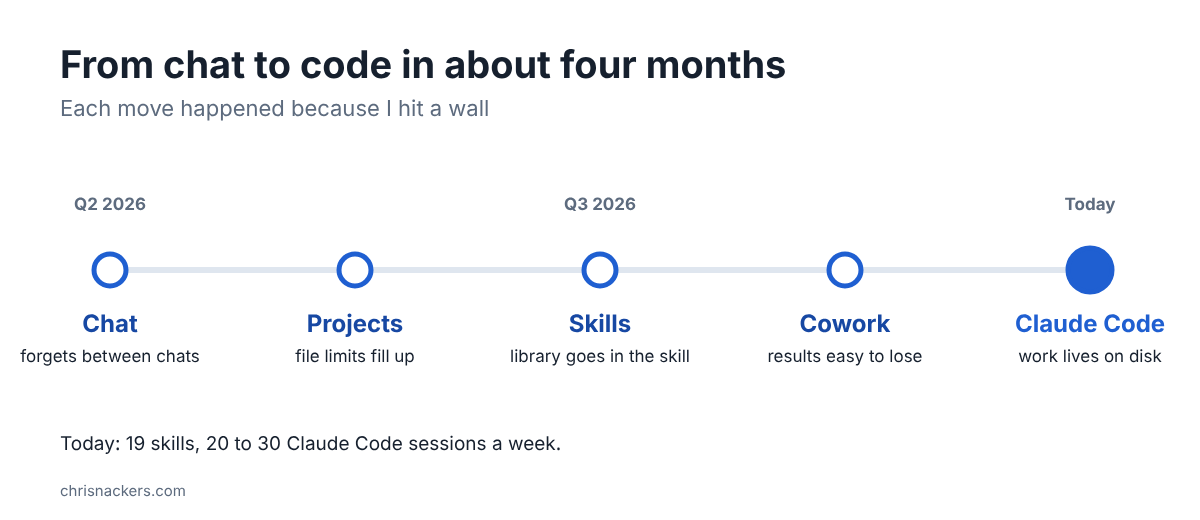
This is the backstory for the “Working With Chris” series: how I went from chatting with an AI to running most of my day through Claude, in about four months. Each step happened because I hit a wall. The walls are the useful part, so that’s what this post is about.
Before Claude
I was a ChatGPT user first, and not a light one. When I exported my history in Q2 2026, it had 297 conversations and 4,326 messages.
Then my company settled on Claude, so I started using it. I was impressed pretty quickly. I’d been working on a scoping project for over a year and never could get what I wanted out of ChatGPT. Within a few weeks, Claude had me further along than that whole year. That sealed it.
Wall 1: chats forget
Plain chats were great until they weren’t. I kept hitting limits on how much a single conversation could know, and on the files I could attach. Every new chat started from zero.
Wall 2: Projects fill up
Projects fixed the forgetting. You give a Project its own instructions and files, and every chat in it starts with that context. More persistent, for sure, and you gain context across multiple chats as long as they are all within that project.
But I hit the Project file limits too. One reference library I needed was over the limit, the limits have changed somewhat, but in my opinion it’s still not meant to be a file storage system. That’s when it clicked for me that a Project is a place you work, not a place you keep things. Attaching various markdown files with instructions and reference information is a good use-case, but if your intention is a reference library you want available to the project as context, then you should really move that out of a project.
Wall 3: so I built it into skills
Skills turned out to be the answer for the reference material. A skill is a packaged set of instructions plus its own reference files, and Claude loads it when the task calls for it. I moved the library INTO the skills. No caps, and the knowledge now travels with me to every place I use Claude.
This is also where things took off. I went from zero skills to 19 in about three months. The busiest ones have been revised dozens of times; my most-revised skill is on version 2.16 of its 2.x line, and my daily operations skill went from 0.1 to 0.34. That’s not a typo, I really do keep tweaking them :)
Wall 4: great sessions, lost results
Cowork (Claude working in a sandbox with access to my files) was powerful. But the outputs, summaries, and context from a session were easy to lose once the session ended.
Wall 5: Claude Code, and putting everything on disk
By Q3 2026 I was working almost entirely in Claude Code. The numbers tell the story better than I can:
- 360 Claude Code sessions on my work machine between Q3 2026 and mid Q4 2026.
- 65 in my busiest week, during the early ramp. Since then it’s been a steady 20 to 30 a week.
- 82% of my weekly usage gone at one point in Q3 2026. Constantly hitting my session limits drove it even more, and between the two I ended up with a rule about using smaller, cheaper models for the grunt work.
As I rapidly expanded my usage into Code and did more and more, I was hitting my session limits constantly, and then I’d be doing work at night to get “just one more” session in. Then I was consuming my weekly limits and getting “stuck”. Let me be clear, I’m on an Enterprise plan, I just was using it THAT much. Then I built out a “team” of Claude Agents, and haven’t had a usage issue since… (Post coming on that one)
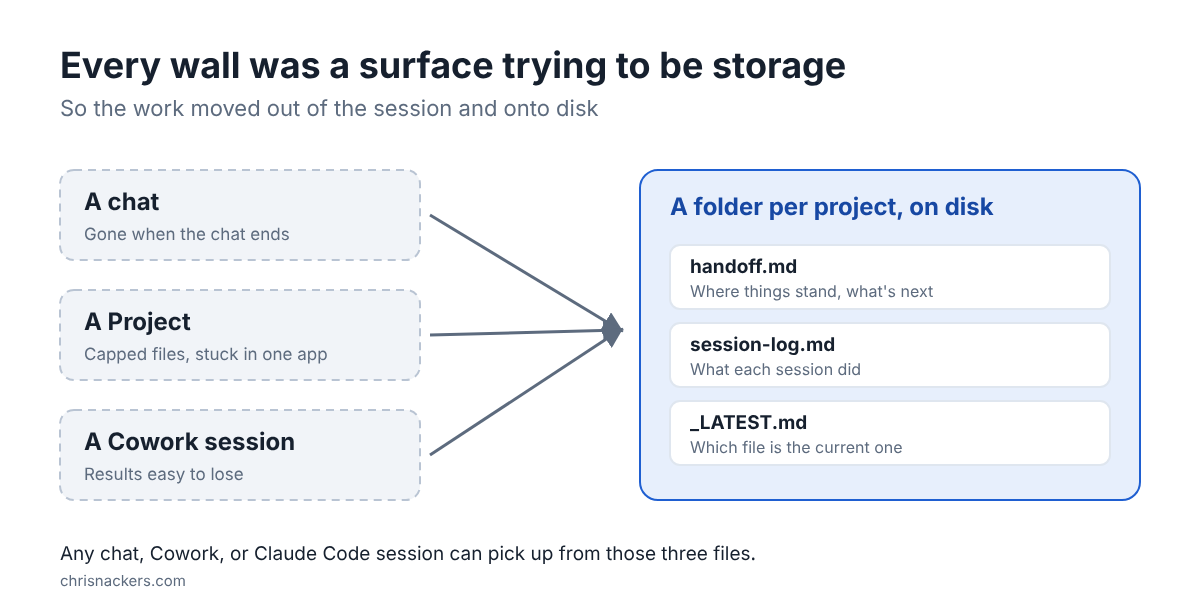
The bigger change wasn’t the tool, though. It was where the work lives. I wrote this down for myself in Q3 2026 and it still holds up:
Every wall was a surface trying to be storage. Every fix moved storage OUT of the transient surface and INTO a durable, uncapped home on the filesystem.
Chats, Projects, Cowork sessions, they’re all surfaces. They’re where you do the work. The work itself needs to live somewhere that survives the session. For me that’s a folder per project, with three small files any session can pick up from. All that research you did, all those pretty documents you made, they only exist in that chat/cowork session. Lose that and it’s gone. (How I solved that gets its own post in this series later)
If you’re starting today
You don’t need to repeat my path. If I had to boil it down:
- Set up your preferences first. Five minutes of setup fixes most of the “it doesn’t know how I work” problem. That’s Part 1 of this series (which has already been posted).
- Build skills from a real task you repeat. Not a cool idea, a real task. Then use it yourself for a week or two and fix what misses.
- Get the work out of the chat. Anything you’d be upset to lose belongs in a file, not a conversation.
What’s coming in this series
Roughly in this order:
- Teach Claude who you are: preferences and standing rules, one master copy, a corrections log.
- Give every session a place to land: the three files every project needs, and surviving a new laptop.
- Run your day through it: cost-aware habits, a morning read, never memorizing a command.
- Build and ship your own skills safely: vetting a skill before you install it, and treating skills like a product.
Hope this helps someone who’s somewhere on this same path. Let me know where you are on it!
-Chris